Thursday, 31 January 2019

SUM Error :MAIN_SWITCH/SUBMOD_SWITCH_KERNEL/KX_SWITCH

Symptom:

SAPup broke during phase SUBMOD_SWITCH_KERNEL/KX_SWITCH in module MAIN_SWITCH 
Downtime I: Switch tables and Kernel
Error Message: Last error code set:
Deleting 'F:\usr\sap\GWP\DVEBMGS01\exe\sapevents.dll' failed: Access is denied.


Cause:

Upgrade is already in downtime phase and is trying to delete some file which is already in use.

Solution:

Close SAP MMC if it is open.
Then repeat the phase.


Hope this helps!!!
Abraham


SUM :"Unable to locate the requested resource"

Symptom:

SUM launching error -Unable to locate the requested resource.
SUM,SAP Host Agent


Solution :

1. Stop the SAP Hostagent with saphostagent -stop

2. Check that there are no running processes which belong to SAP Host Agent, and kill any remaining Host Agent's sapstartsrv processes.

3. Delete the /tmp/.sapstartsrv99_sapstartsrv.log and content of the Host Agent's work directory

4. Stop the saphostwatcherservice also

5. Launch the SUM again


Also you can refer the below SAP Note :
2475146 - SUM : logon via SAP Host Agent is failing "Unable to locate the requested resource"

Hope this helps!!!
Abraham

How to check Tablespace size for SAP systems

Solution -1: Check from SAP front end:

Execute T-code DB02.

Select Space ->Tablespaces ->Overview
    
For getting the updated details make sure that the SAP Job SAP_COLLECTOR_FOR_PERFMONITOR is scheduled in your system

Solution-2: Check from SAP front end using query:

Execute DB02
Select Performance ->Additional Functions ->SQL Command Editor.
Paste the query in the input Query Field ,Load the query and Execute
You can also save the query for future use


Query :

SELECT A.TABLESPACE_NAME, A.STATUS,
ROUND(C.SIZE_GB/1024/1024,2) SIZE_MB,
ROUND((C.SIZE_GB-B.FREE_GB)/1024/1024,2) USAGE_MB,
ROUND(B.FREE_GB/1024/1024,2) FREE_MB,
ROUND(100*(1-(FREE_GB/SIZE_GB)),2) PCT_USAGE,
ROUND(C.SIZE_GB/1024/1024/1024,2) SIZE_GB,
ROUND((C.SIZE_GB-B.FREE_GB)/1024/1024/1024,2) USAGE_GB,
ROUND(B.FREE_GB/1024/1024/1024,2) FREE_GB
FROM (SELECT TABLESPACE_NAME, STATUS FROM DBA_TABLESPACES) A,
(SELECT tablespace_name,
SUM(BYTES) FREE_GB
FROM DBA_FREE_SPACE
GROUP BY tablespace_name)B,
(SELECT TABLESPACE_NAME, SUM(BYTES) SIZE_GB
FROM dba_data_files
GROUP BY tablespace_name) C
WHERE A.TABLESPACE_NAME = B.TABLESPACE_NAME
AND A.TABLESPACE_NAME = C.TABLESPACE_NAME
ORDER BY TABLESPACE_NAME;

Solution 3: Using BRTOOLS

Use BRTOOLS to find the tablesapce size 


Hope this helps!!!
Abraham

An action triggered by the server was denied based on a rule

Symptom:

An action triggered by the server was denied based on a rule,Access denied,Save File to local drive denied.

Cause:

While downloading a file from SAP you got a popup as below and you have clicked "DENY".


And Now you are getting a message as " Access Denied" or An action triggered by the server was denied based on a rule


Solution:

1. Close all open SAP GUI sessions

2. From the SAP GUI logon pad, select OPTIONS (right side top):


Options ->Security->Security Settings

3. Click on "Restore Defaults" as shown in the above image.

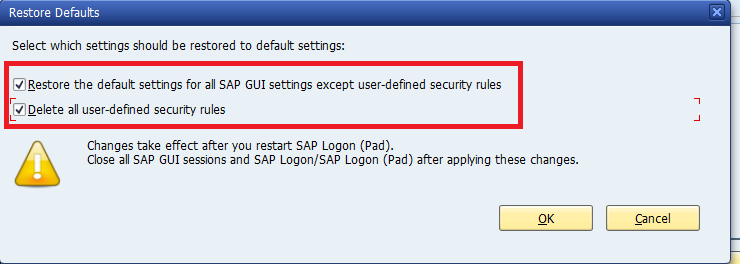
4. Check both the check boxes in the below image and select OK.


5. You can delete the user defined roles only also:

Select the Open Security Configuration tab:


Select the both check boxes as shown below and the rows with the DENY action and click DELETE


Hope this helps!!!
Abraham

SAP BO/BOBJ DISK Space is full

Symptom : 

SAP BO/BOBJ disk space is getting full very soon.

Solution:

1. Check the Logging folder size:

<BO install folder>\SAP BusinessObjects\SAP BusinessObjects Enterprise XI 4.0\logging

C:\Program Files (x86)\SAP BusinessObjects\SAP BusinessObjects Enterprise XI 4.0\logging

Delete the old log file and trace file from logging folder.

2. Check the DB log file size:

<BO install folder>\SAP BusinessObjects\qlanywhere\database

C:\Program Files (x86)\SAP BusinessObjects\sqlanywhere\database

In this you will find the BI4_Audit and BI4_CMS log file (.txt files)

Check the size of both the files .

Stop the Server Intelligence Agent , SQL Anywhere for SAP Business Intelligence and any other associated services.

Move the BI4_Audit and BI4_CMS log file to a different location or rename the files.

Start the Server Intelligence Agent , SQL Anywhere for SAP Business Intelligence and any other associated services.

You will find new log files has been created in the location <BO install folder>\SAP BusinessObjects\qlanywhere\database

Hope this helps!!!
Abraham

Wednesday, 30 January 2019

ORA-00600: internal error code, arguments: [ktspfpblk:kcbz_objdchk], [0], [0],

Symptom:

ORA-00600,ORA-00600: [ktspfpblk:kcbz_objdchk],[0], [0], ,DBSQL_SQL_ERROR,CX_SY_OPEN_SQL_DB,
Index Corruption

Solution:

1. Check if you have any runtime errors in ST22:

Runtime Errors DBSQL_SQL_ERROR
Exception CX_SY_OPEN_SQL_DB
Date and Time 08.01.2019 15:44:06
Parameters:
P1 "DDXTF"
P2 "SQL code: 600"
P3 "SQL message: ORA-00600: internal error code, arguments:
[ktspfpblk:kcbz_objdchk], [0], [0], [1], [], [], [], [], [], [], [], []"
P4 "SQL dbsl rc: 99"

2. Check if you can identify the table having the issue from the runtime error:


Here issue is with table "DDXTF"

4. Analyze the table and the associated index to solve the issue:

Save the structure of the index.
Drop the index.
Recreate the index

Follow the below link for the detailed steps :

Hope this helps!!!
Abraham


ORA-08103:Object No Longer Exists

Symptom:

ORA-08103,Index Corruption,ORA-00600


Solution:

1. Check if you have any runtime errors in ST22:

Any ORA-00600 errors or ORA-08103 .
ORA-08103:Object No Longer Exists,ORA -00600


ORA-08103:Object No longer Exists,ORA-00600

2. From the runtime error try to identify the table having index .

3. Analyze the table and the associated index :

ANALYZE TABLE <OWNER>."<TABLE_NAME>" VALIDATE STRUCTURE ONLINE;
ANALYZE INDEX <OWNER>."<INDEX_NAME>" VALIDATE STRUCTURE ONLINE;

The analyze command will return the ORA-08103 :object no longer exists for the index having issues

4. Save the structure of the index :

SQL> set pagesize 0
SQL> set long 90000

SQL> SELECT DBMS_METADATA.GET_DDL('INDEX','<INDEX_NAME>','<OWNER>') from dual;

5. Drop the index.

SQL> DROP INDEX "OWNER"."INDEX_NAME";

6.  Recreate the index with the saved structure in point 4.

7.  Analyze the index again to find if the issue is solved

Cause of the issue :

We get this error usually when tables are being dropped/truncated while a SQL statement for those tables is still in execution. In the case of an index, it might be caused by an index rebuild. In other words the object has been deleted by another session since the operation began.

Hope this helps!!!
Abraham